



![JBL Junior 320BT Wireless Bluetooth On-Ear Headphone with Mic for Kids - Blue [Open Box]](https://d30ek1sgwm2r4c.cloudfront.net/sites/files/treoo/images/products/202411/600xAUTO/jbl-junior-320bt-blue_2.jpg.webp "JBL Junior 320BT Wireless Bluetooth On-Ear Headphone with Mic for Kids - Blue [Open Box]")
![JBL Junior 320BT Wireless Bluetooth On-Ear Headphone with Mic for Kids - Blue [Open Box]](https://d30ek1sgwm2r4c.cloudfront.net/sites/files/treoo/images/products/202411/600xAUTO/jbl-junior-320bt-blue_1.jpg.webp "JBL Junior 320BT Wireless Bluetooth On-Ear Headphone with Mic for Kids - Blue [Open Box]")












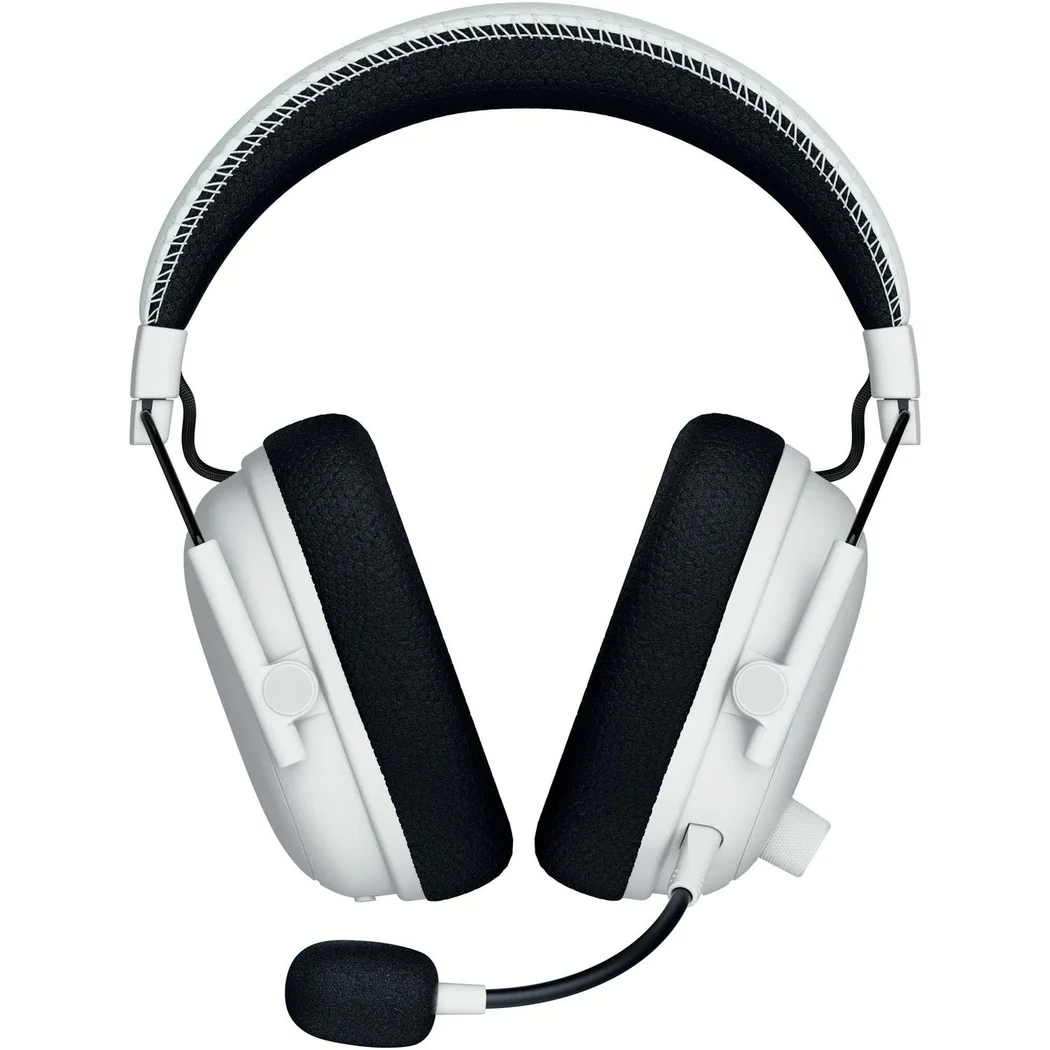
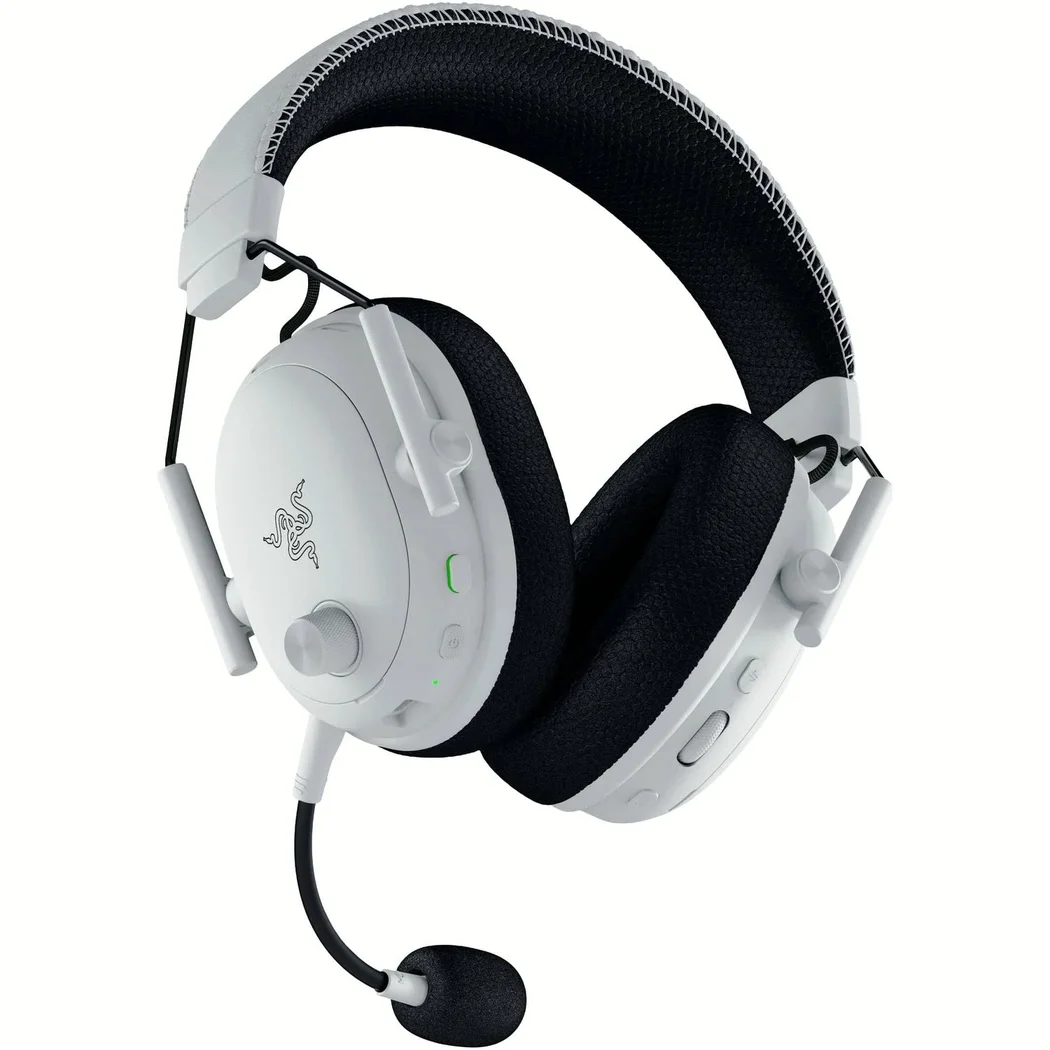
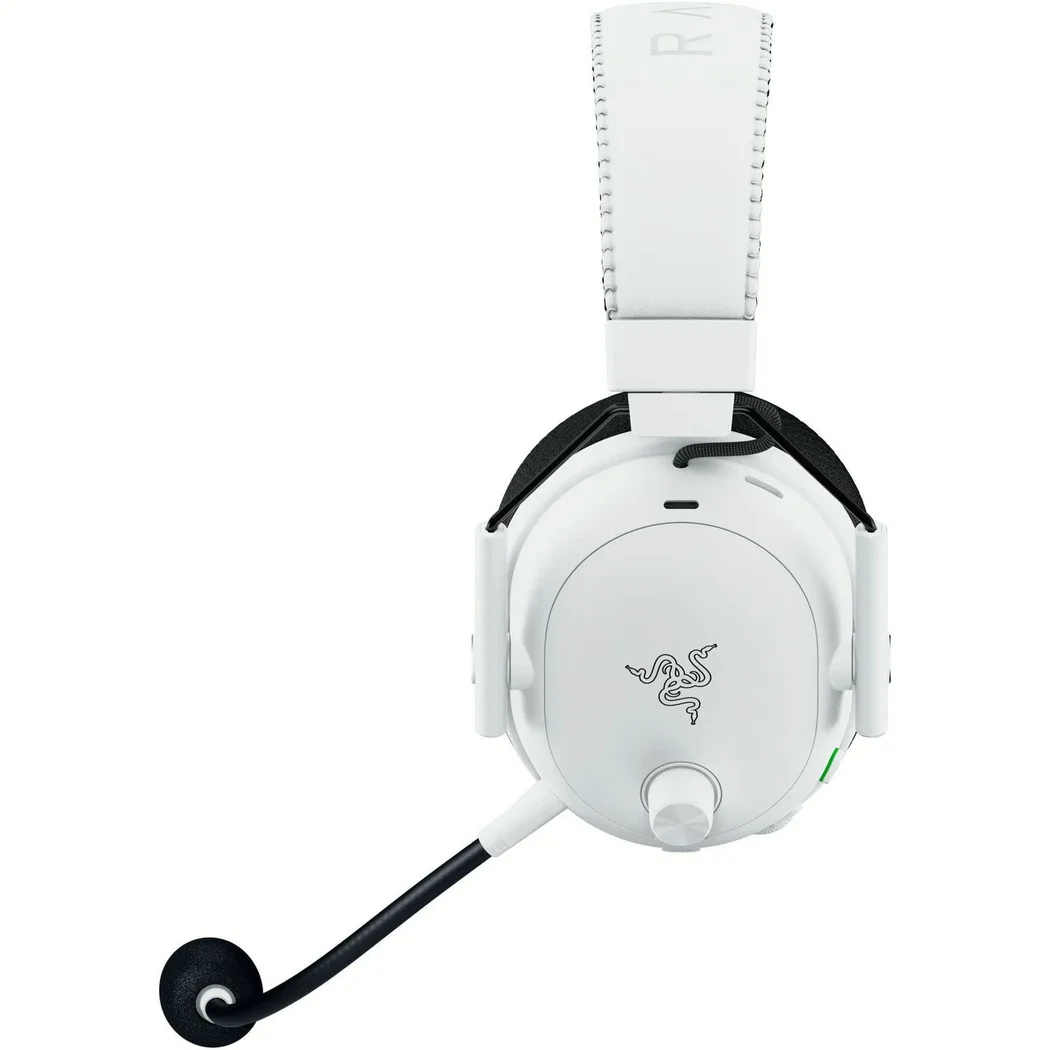
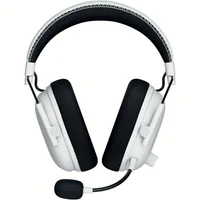
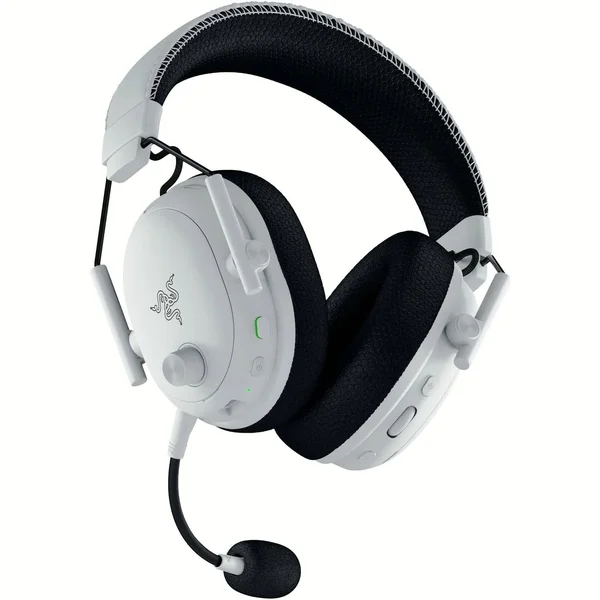
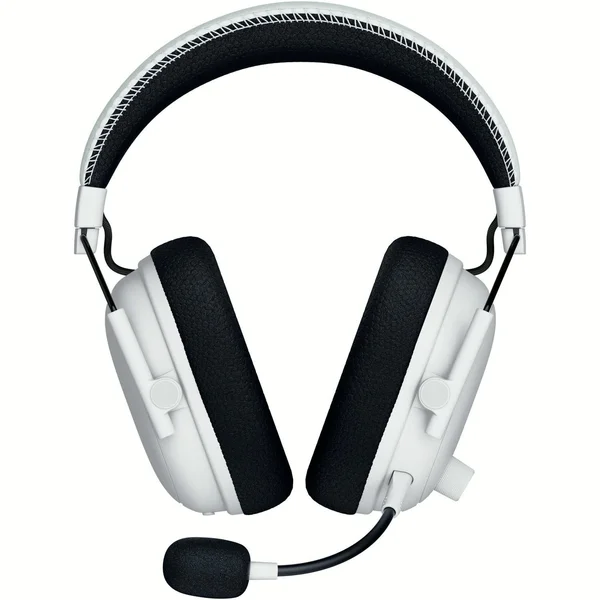
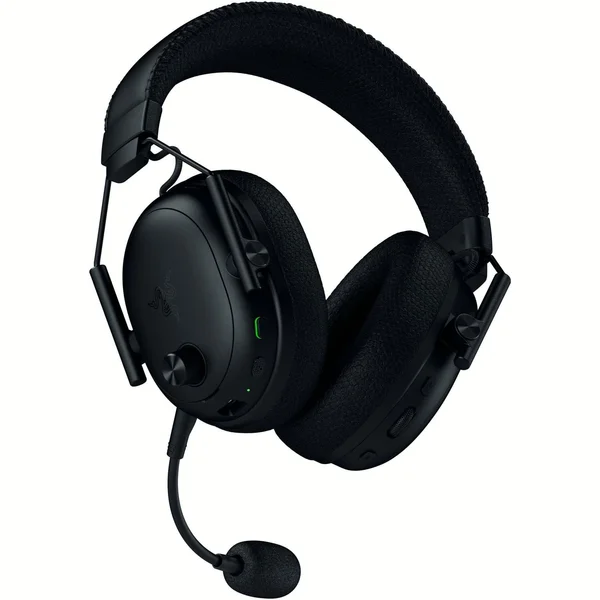
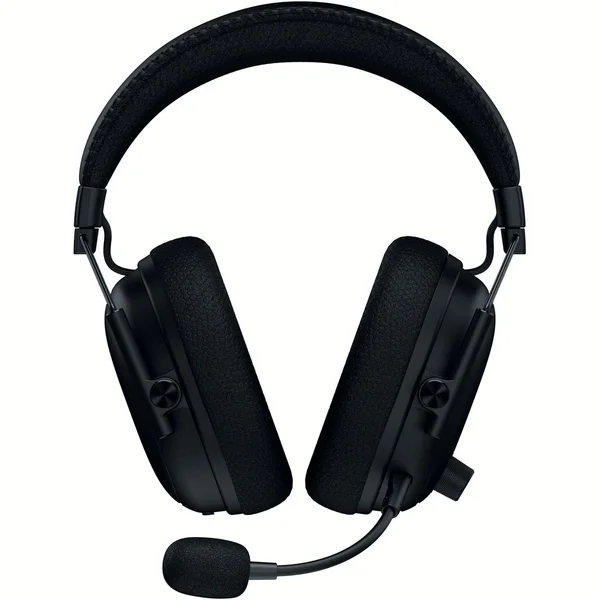
Razer BlackShark V3 Pro Wired/Wireless Bluetooth+2.4GHz Noise-Cancelling Multi-Platform Over-Ear Gaming Headset with Mic - White


- WIN MORE CLUTCH MOMENTS — Ultra‑low 10 ms Razer HyperSpeed Wireless Gen‑2 delivers near‑instant audio response for split‑second reactions in competitive FPS and esports play
- COMMUNICATE WITH PRO LEVEL CLARITY — Detachable HyperClear Full Band 12 mm mic captures detailed shot calls while suppressing background noise for focused team comms
- STAY LOCKED IN — Hybrid Active Noise Cancellation blocks distractions and enhances immersion for tournament practice, streaming, or ranked gaming sessions
- HEAR EVERY FOOTSTEP — TriForce Bio‑Cellulose 50 mm Gen‑2 drivers provide precise positional cues and frequency separation tuned for competitive shooters
- PLAY ACROSS PLATFORMS — Simultaneous 2.4 GHz wireless and Bluetooth audio plus USB and 3.5 mm wired modes support PC, console, and mobile gaming
- GAIN AUDIO ADVANTAGE — THX Spatial Audio with 7.1.4 surround creates accurate 3D sound placement for competitive awareness on supported Windows systems
- SEAMLESS PC‑FIRST CONNECTIVITY — Game across PC, Mac, and more with 2.4 GHz wireless, Bluetooth 5.3, USB, or 3.5 mm wired; simultaneously mix wireless game audio and Bluetooth, with broad support for PlayStation, Switch, and mobile devices
- PRO-TUNED FPS PROFILES AND CUSTOMIZABLE EQ — Unlock an audio advantage with game-specific EQ profiles, precision-tuned with Razer's roster of esports champions; create custom EQs, save it to the headset, and be ready to compete anytime
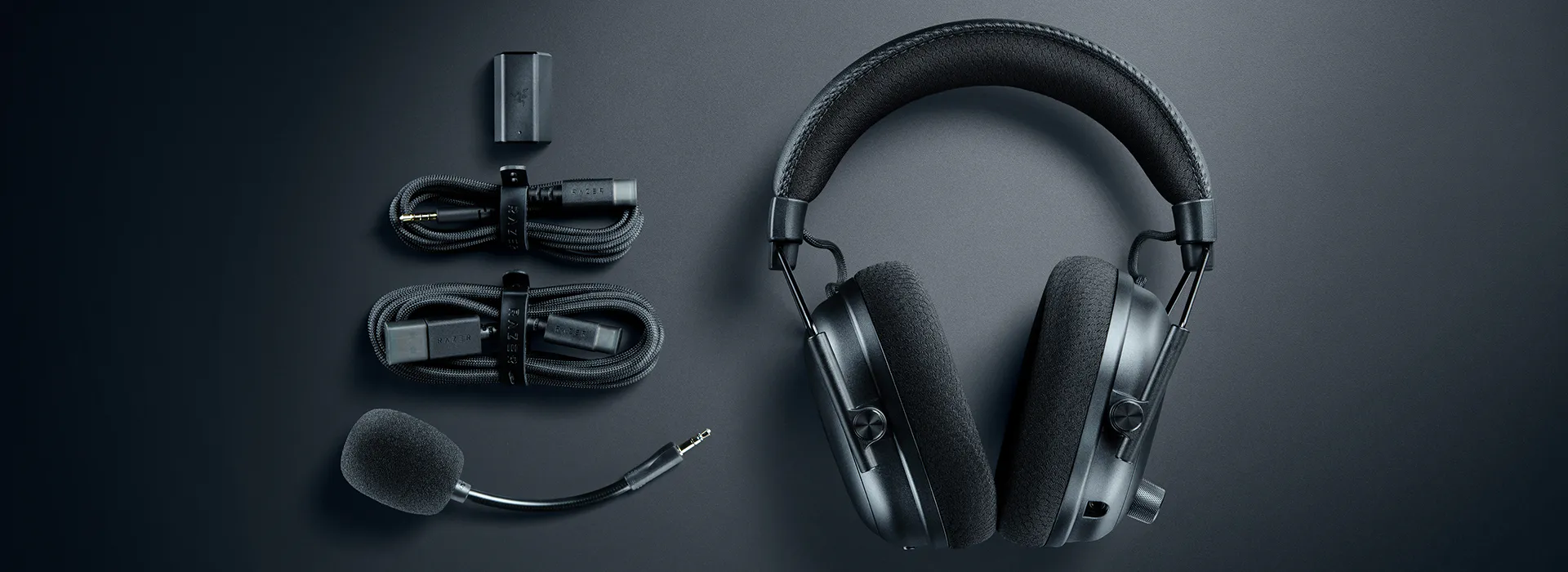
- Razer BlackShark V3 Pro
- Adapter
- Detachable Razer HyperClear Full Band 12mm Mic
- Cable
- User Manual
Razer BlackShark V3 Pro — the wireless ANC esports headset, built for the split second
In short: the Razer BlackShark V3 Pro is Razer's most advanced wireless noise-cancelling esports headset. It pairs an ultra-low-latency wireless link with a detachable full band microphone, hybrid active noise cancellation, second-generation TriForce bio-cellulose drivers and THX Spatial Audio, and it can hold two wireless connections at once so comms and game audio never have to take turns. It comes in Black and White, and it is available from TREOO, an official Razer dealer in Singapore, with local warranty support.
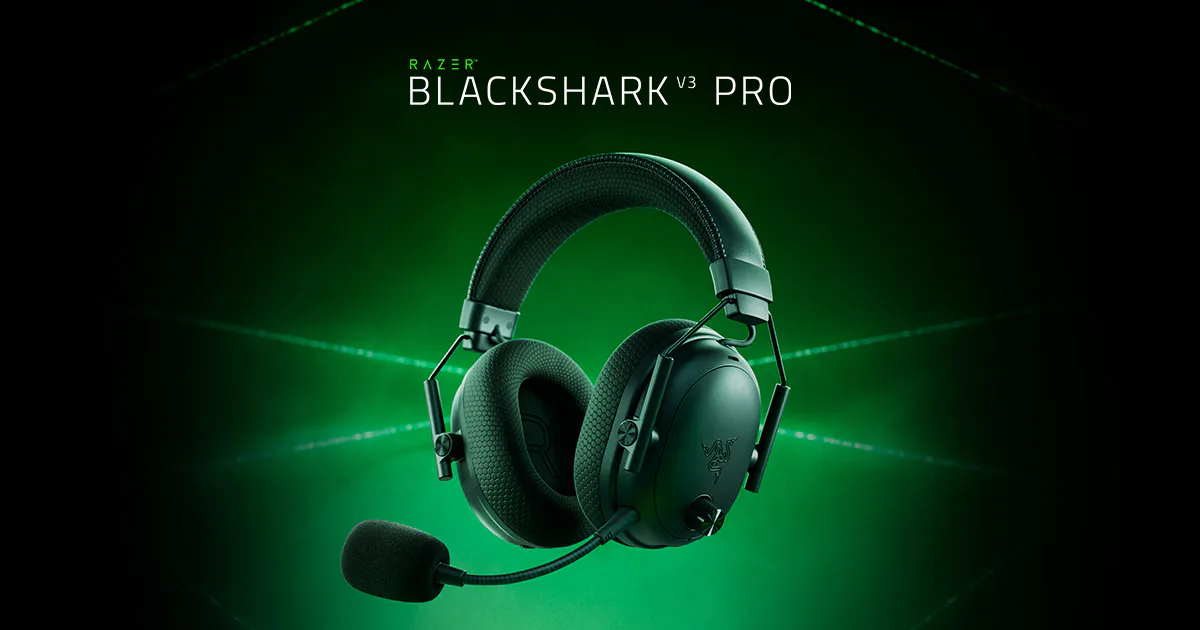
Built for the split second that decides a round
Competitive play is not decided over a whole match. It is decided in the moment a door opens, a reload starts or a player crosses a sightline, and everything the headset does has to happen before that moment passes. Razer HyperSpeed Wireless Gen-2 is built for exactly that: a connection optimised for ultra-low latency, so the sound of a footstep reaches you while the footstep is still happening.
That difference is easiest to feel rather than describe. Cues land with the action instead of just behind it, so a clutch play or a split-second decision is made on what is happening now rather than on what has already happened. Razer built the BlackShark V3 Pro around that single idea, and the rest of the headset follows from it.
A microphone that carries the call
The HyperClear Full Band microphone is detachable, and it is the part of the headset your team actually hears. A large capsule and a full band design capture the detail of a shotcall rather than a compressed version of it, and a unidirectional pick-up pattern points the microphone at your voice while rejecting what is happening around you.
The practical effect is that callouts arrive clean the first time. In a game where a teammate has to act on what you say within a second, a microphone that suppresses background noise and keeps voices intelligible is worth as much as the driver tuning, and Razer treats it that way: the microphone is a designed part of the headset, not an accessory bolted on afterwards.
Noise cancelled, focus kept
Hybrid active noise cancellation reduces the noise that sits between you and the game — a fan, a keyboard, a room full of people — so the cues you are listening for are not competing with everything else. The level of cancellation is adjustable rather than fixed, through Razer Synapse on a PC or the Razer Audio app on a phone, and Ambient Mode lets the room back in when someone is talking to you.
Isolation starts with the fit. The earcups swivel to sit flat against the head, and the memory foam cushions form a seal that does part of the noise-cancelling work before the electronics are asked to. Those cushions are dual-layered FlowKnit: a leatherette outer layer for isolation, layered with a breathable, moisture-wicking fabric against the skin, which is what keeps a long session comfortable rather than merely quiet.
The rest of the build is meant to survive the same sessions. The headband is leatherette, the swivel holders are reinforced, and the whole assembly is put together to stay secure through the knocks and bumps of a desk, a bag and a tournament. None of it is decorative: a headset that shifts on your head mid-round has stopped being an esports headset.
Drivers that find the footstep
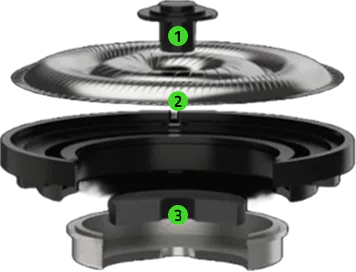
The second-generation TriForce bio-cellulose drivers are tuned for clarity and positional performance rather than for a big first impression. A bio-cellulose diaphragm is light and stiff, which lets it start and stop quickly, and that is what makes the difference between hearing that something happened and hearing where it happened.
Three changes carry the generation. A redesigned driver plug reduces harmonic distortion, so the cues that matter stay clean and easy to pick out. The diaphragm itself is ultra-thin, which sharpens the separation between the frequencies that carry in-game information. And a larger magnet increases magnetic field strength, which gives the low end more precision and lifts overall output, so footsteps and distant movement come through with greater clarity instead of being buried under everything else.
Positional audio that tells you where
THX Spatial Audio expands the soundstage beyond the two earcups, so a sound has a direction as well as a volume. Precise overhead audio is part of that: the engine places cues above and around you rather than only left and right, which is what turns a noise into a bearing.
The result is competitive awareness rather than spectacle. You hear a player on the stairs, not simply a player somewhere; you hear a reload behind a wall and know which side of the wall. THX Spatial Audio is integrated into Razer Synapse, so it is switched on and tuned from the same place as the rest of the headset's settings on a Windows PC.
Tuned by the best, adjustable on the fly
The equaliser profiles are not generic presets with game names attached. Razer tuned game-specific profiles with its roster of esports champions, and the profiles cover the shooters those players compete in: Counter-Strike 2, Apex Legends, Call of Duty: Black Ops 6 and Halo Infinite. The players behind them include NiKo, Spinx, Hakis, Unlucky, Shotzzy, Dashy, Snip3Down and Lastshot, and the tuning is aimed at the same thing they are: hearing the cue before the other player does.
You are not locked into them. Custom equaliser profiles can be built and stored on the headset itself, so a setup travels with the hardware rather than living on one PC, and Game, Movie, Music and Esports presets cover everything that is not a match.
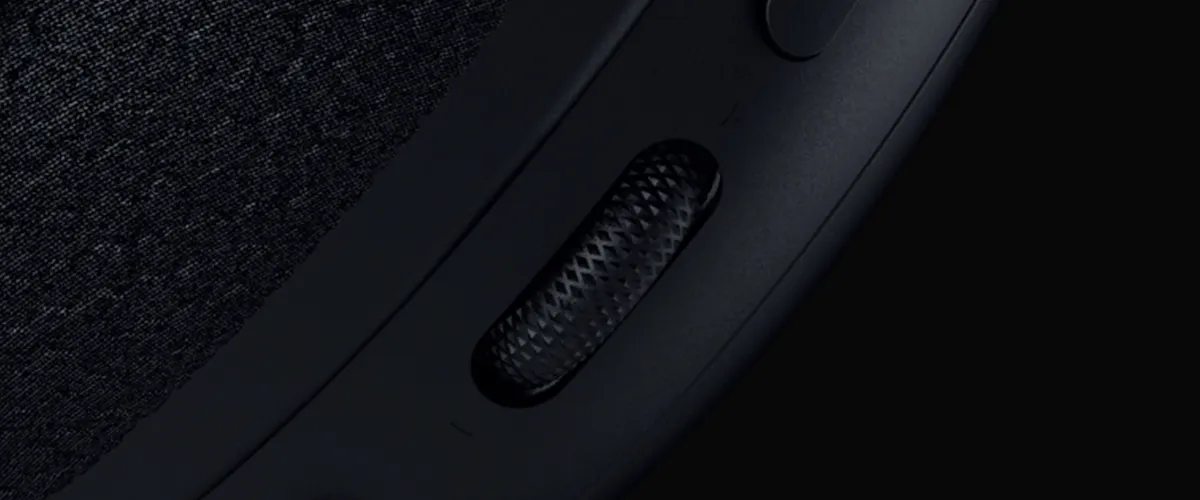
The on-earcup control is a configurable roller, and what it does is up to you. Set it to footstep booster and it raises footstep audio on the fly, whatever profile is running. Set it to game-chat balance and it mixes the two independently, so a teammate never disappears under the game. Set it to mic monitoring and it feeds your own voice back through the headset, which is how you keep your levels in check without asking anyone.
Two connections at once
Most headsets make you choose. The BlackShark V3 Pro does not: it can run its low-latency wireless connection and a Bluetooth connection at the same time, so game audio arrives over one and a phone call or a voice chat arrives over the other. A double-tap of the SmartSwitch button puts it into simultaneous audio, and a light on the left earcup tells you which mode you are in.
When a call comes in while both are live, the headset gives the microphone to the Bluetooth connection, so you can answer without leaving the game or reaching for a phone. Beyond those two wireless routes there is USB and a standard headphone cable, which means the headset still works when a battery is flat, a dongle is not welcome, or the device in front of you has no wireless at all.
Battery that outlasts the session
The battery is sized for the way people actually play: days of use between charges, and a short top-up that returns hours of listening rather than a warning tone and a hunt for a cable. Charging is over USB-C, the same cable most desks already have.
The app, the faceplates and the long game
The Razer Audio app puts the headset's settings on a phone: equaliser profiles, button remapping, noise cancellation and monitoring, all from one screen. On a PC, Razer Synapse carries the same controls alongside THX Spatial Audio and the game-specific profiles.
Razer also designed the earcups to change. Replaceable magnetic faceplates are on the way, which means the look of the headset is not fixed for the life of the hardware — useful if you follow a team, or if you simply want a pair that does not look like everyone else's.

Black or White
This listing covers both finishes. Black is the finish Razer uses in its own product imagery and the one most players picture: matte, low-contrast, and quiet next to a monitor, a keyboard and the rest of a desk. White is the same headset in a light finish, with the black cushions, headband padding and cable kept as contrast, so it reads as a brighter object on a pale desk rather than a whitewashed one.
Nothing else changes between them. The earcups, the swivel joints, the FlowKnit cushions, the drivers, the microphone, the controls and the connections are identical, and both finishes ship with the same accessories. The choice is a choice about the desk, not about the sound.
What is in the box
Every BlackShark V3 Pro arrives with the headset itself, the detachable HyperClear Full Band microphone, the wireless dongle for the low-latency connection, a USB cable for charging and a headphone cable for wired listening. Between them they cover every way the headset can be connected, so nothing else has to be bought to use it on day one.
Frequently Asked Questions
It brings a faster ultra-low-latency wireless connection, a detachable full band microphone, hybrid active noise cancellation, the second generation of the TriForce bio-cellulose drivers and THX Spatial Audio, and it adds three wired connection options alongside the wireless ones.
THX Spatial Audio is positional audio that places sounds around and above you rather than only left and right, which is how a noise becomes a direction. It is integrated into Razer Synapse: install Synapse on a Windows 11 PC and switch it on from there.
Yes. The headset has Bluetooth as well as its own low-latency wireless connection, so a phone pairs directly, and the Razer Audio app gives you the equaliser, the controls and the noise-cancelling modes on the same device.
Connect the headset to both its wireless dongle and to Bluetooth, then double-tap the SmartSwitch button. The light on the left earcup shows which mode is running, and in simultaneous mode you hear both sources at once. If a call arrives on the phone, the headset hands the microphone to the Bluetooth connection so you can answer without leaving the game.
The SmartSwitch button cycles the equaliser presets on a single press and switches between wireless, Bluetooth and simultaneous audio on a double tap. The noise-cancelling button steps through cancellation, Ambient Mode and off, and the configurable roller handles game-chat balance, mic monitoring or footstep boost. The power button doubles as a media control for play, pause and track skipping.
Speak into the microphone with the symbol on the capsule facing your mouth and the capsule held close, rather than off to the side. The unidirectional pick-up pattern is doing the work of rejecting the room, so it only helps if it is pointed at your voice.
A full charge runs for days of play rather than hours, and a short top-up returns several hours of listening, which is enough to cover a session that starts sooner than expected. Charging is over USB-C, so the cable you already use for a phone will do it.
Start with the profile tuned for the game you are playing, because those were built with esports players to lift the cues that matter in that title. Game, Movie, Music and Esports presets cover everything else, and a custom profile in Razer Synapse or the Razer Audio app is the right answer once you know what you want to hear more of.
It is noise cancellation that works from microphones on both the outside and the inside of the earcup, so it responds to the room and to what reaches your ear. The level is adjustable rather than fixed, through Razer Synapse or the Razer Audio app, and Ambient Mode turns the cancellation down so you can hear someone speaking to you.
This listing covers Black and White. Both are the same headset with the same drivers, microphone, cushions, controls and connections; only the finish on the earcups and headband changes.
The Razer BlackShark V3 Pro is available from TREOO, an official Razer dealer in Singapore, with local warranty support. If you are not sure whether the wireless V3 Pro or a wired BlackShark suits the way you play, our team is happy to talk it through before you buy.
| Product Availability | Available (current model) |
| Product Type | Headphone |
| Style/Type | Over-Ear (circumaural) |
| Features | Bluetooth, Microphone, Active Noise-Cancelling (ANC) |
| Headphone/Earphone Cover Design | Closed-back |
| Driver Count (Per Side) | 1 |
| Driver Configuration | Dynamic (DD) |
| Driver Size | 50mm |
| Connectivity | Fully Wireless |
| Bluetooth Version | v5.3 |
| Bluetooth Codecs | SBC |
| Waterproof Rating | IPX0 – No protection |
| Frequency Response (Hz) | 12 Hz–28 kHz |
| Impedance (Ω) | 32 Ω |
| Sensitivity | 108 db |
| Voice Assistants | - None - |
| Streaming Services | N.A |
| Mic for Calls/Communication | Boom Microphone (Non-Detachable/Retractable) |
| Socket Connector Type | - N.A - |
| Jack Connector Type | - N.A - |
| Input Connectivity Options | USB Type-A (Full sized) [Data/Audio Signal], Bluetooth, 2.4GHz Wireless RF |
| Battery Life (Hours) | Up to 70 hours |
| Product Weight (g) | 1,044g |
| Colour | White |
| Package Contents |
|
| Warranty | 2 years warranty (local) |
If you're based in Singapore,
- spend $300 or more for free doorstep delivery1.
($250 for Silver/Gold/Platinum VIP members) - add a few more bucks, for delivery during the night/weekend, or quicker prioritised delivery options2.
- self-collection is possible at our Showroom, based in Ubi (nearest to MacPherson MRT). Find out where, and how to get to us here.
- and yes, you may arrange your own 3rd party logistics to pickup your purchases on your behalf.
GrabExpress, Lalamove, GoGoX, RydeSEND services are welcome.
View additional Terms & Conditions associated to local doorstep delivery service.
Friends from Overseas,
- we do ship internationally.
- certain brands impose cross-country supply restrictions, so we may not be able to ship to such countries for restricted brand(s).
- shipping fees are calculated according to total gross actual or volumetric weight of all item(s) in cart, whichever higher.
- shipping fees will vary depending on international carrier(s)3, and will be displayed during checkout.
- do be aware of additional import tax/VAT that may apply.
Due to recent changes in U.S. trade regulations, additional tariffs are being imposed on products manufactured in China and imported into the United States. As many of our audio products are made in China, orders shipped to U.S. addresses may be subject to an added tariff charge at checkout, reflected as a "U.S. Import Tariff Surcharge". Please note that this surcharge amount is determined by U.S. import policies and may vary significantly depending on product categories and any future policy adjustments. These charges are necessary to ensure compliance with U.S. customs requirements and to allow us to continue serving our U.S. customers reliably. We strongly encourage you to review the total cost at checkout before placing your order.
This surcharge is temporary but necessary during this period of significantly increased operational pressure as a result of the ongoing geo‑political situation in the Middle East.
Orders shipped to Gulf Cooperation Council (GCC), Africa, US and EU regions may be subject to an added surcharge at checkout, reflected as a "Temporary Emergency Situational Surcharge". Please note that this surcharge amount is determined by our freight partners, and may subject to adjustments according to situational updates. We strongly encourage you to review the total cost at checkout before placing your order.
View additional Terms & Conditions associated to international door to door shipping service.
1 Terms and condition do apply for free delivery. For more information, click here to view.
2 View our updated list of local delivery options.
3 View our updated list of international carriers.
No Reviews Available for this Product Yet. Leave Your Review
Razer BlackShark V3 Pro — the wireless ANC esports headset, built for the split second
In short: the Razer BlackShark V3 Pro is Razer's most advanced wireless noise-cancelling esports headset. It pairs an ultra-low-latency wireless link with a detachable full band microphone, hybrid active noise cancellation, second-generation TriForce bio-cellulose drivers and THX Spatial Audio, and it can hold two wireless connections at once so comms and game audio never have to take turns. It comes in Black and White, and it is available from TREOO, an official Razer dealer in Singapore, with local warranty support.
Built for the split second that decides a round
Competitive play is not decided over a whole match. It is decided in the moment a door opens, a reload starts or a player crosses a sightline, and everything the headset does has to happen before that moment passes. Razer HyperSpeed Wireless Gen-2 is built for exactly that: a connection optimised for ultra-low latency, so the sound of a footstep reaches you while the footstep is still happening.
That difference is easiest to feel rather than describe. Cues land with the action instead of just behind it, so a clutch play or a split-second decision is made on what is happening now rather than on what has already happened. Razer built the BlackShark V3 Pro around that single idea, and the rest of the headset follows from it.
A microphone that carries the call
The HyperClear Full Band microphone is detachable, and it is the part of the headset your team actually hears. A large capsule and a full band design capture the detail of a shotcall rather than a compressed version of it, and a unidirectional pick-up pattern points the microphone at your voice while rejecting what is happening around you.
The practical effect is that callouts arrive clean the first time. In a game where a teammate has to act on what you say within a second, a microphone that suppresses background noise and keeps voices intelligible is worth as much as the driver tuning, and Razer treats it that way: the microphone is a designed part of the headset, not an accessory bolted on afterwards.
Noise cancelled, focus kept
Hybrid active noise cancellation reduces the noise that sits between you and the game — a fan, a keyboard, a room full of people — so the cues you are listening for are not competing with everything else. The level of cancellation is adjustable rather than fixed, through Razer Synapse on a PC or the Razer Audio app on a phone, and Ambient Mode lets the room back in when someone is talking to you.
Isolation starts with the fit. The earcups swivel to sit flat against the head, and the memory foam cushions form a seal that does part of the noise-cancelling work before the electronics are asked to. Those cushions are dual-layered FlowKnit: a leatherette outer layer for isolation, layered with a breathable, moisture-wicking fabric against the skin, which is what keeps a long session comfortable rather than merely quiet.
The rest of the build is meant to survive the same sessions. The headband is leatherette, the swivel holders are reinforced, and the whole assembly is put together to stay secure through the knocks and bumps of a desk, a bag and a tournament. None of it is decorative: a headset that shifts on your head mid-round has stopped being an esports headset.
Drivers that find the footstep
The second-generation TriForce bio-cellulose drivers are tuned for clarity and positional performance rather than for a big first impression. A bio-cellulose diaphragm is light and stiff, which lets it start and stop quickly, and that is what makes the difference between hearing that something happened and hearing where it happened.
Three changes carry the generation. A redesigned driver plug reduces harmonic distortion, so the cues that matter stay clean and easy to pick out. The diaphragm itself is ultra-thin, which sharpens the separation between the frequencies that carry in-game information. And a larger magnet increases magnetic field strength, which gives the low end more precision and lifts overall output, so footsteps and distant movement come through with greater clarity instead of being buried under everything else.
Positional audio that tells you where
THX Spatial Audio expands the soundstage beyond the two earcups, so a sound has a direction as well as a volume. Precise overhead audio is part of that: the engine places cues above and around you rather than only left and right, which is what turns a noise into a bearing.
The result is competitive awareness rather than spectacle. You hear a player on the stairs, not simply a player somewhere; you hear a reload behind a wall and know which side of the wall. THX Spatial Audio is integrated into Razer Synapse, so it is switched on and tuned from the same place as the rest of the headset's settings on a Windows PC.
Tuned by the best, adjustable on the fly
The equaliser profiles are not generic presets with game names attached. Razer tuned game-specific profiles with its roster of esports champions, and the profiles cover the shooters those players compete in: Counter-Strike 2, Apex Legends, Call of Duty: Black Ops 6 and Halo Infinite. The players behind them include NiKo, Spinx, Hakis, Unlucky, Shotzzy, Dashy, Snip3Down and Lastshot, and the tuning is aimed at the same thing they are: hearing the cue before the other player does.
You are not locked into them. Custom equaliser profiles can be built and stored on the headset itself, so a setup travels with the hardware rather than living on one PC, and Game, Movie, Music and Esports presets cover everything that is not a match.
The on-earcup control is a configurable roller, and what it does is up to you. Set it to footstep booster and it raises footstep audio on the fly, whatever profile is running. Set it to game-chat balance and it mixes the two independently, so a teammate never disappears under the game. Set it to mic monitoring and it feeds your own voice back through the headset, which is how you keep your levels in check without asking anyone.
Two connections at once
Most headsets make you choose. The BlackShark V3 Pro does not: it can run its low-latency wireless connection and a Bluetooth connection at the same time, so game audio arrives over one and a phone call or a voice chat arrives over the other. A double-tap of the SmartSwitch button puts it into simultaneous audio, and a light on the left earcup tells you which mode you are in.
When a call comes in while both are live, the headset gives the microphone to the Bluetooth connection, so you can answer without leaving the game or reaching for a phone. Beyond those two wireless routes there is USB and a standard headphone cable, which means the headset still works when a battery is flat, a dongle is not welcome, or the device in front of you has no wireless at all.
Battery that outlasts the session
The battery is sized for the way people actually play: days of use between charges, and a short top-up that returns hours of listening rather than a warning tone and a hunt for a cable. Charging is over USB-C, the same cable most desks already have.
The app, the faceplates and the long game
The Razer Audio app puts the headset's settings on a phone: equaliser profiles, button remapping, noise cancellation and monitoring, all from one screen. On a PC, Razer Synapse carries the same controls alongside THX Spatial Audio and the game-specific profiles.
Razer also designed the earcups to change. Replaceable magnetic faceplates are on the way, which means the look of the headset is not fixed for the life of the hardware — useful if you follow a team, or if you simply want a pair that does not look like everyone else's.
Black or White
This listing covers both finishes. Black is the finish Razer uses in its own product imagery and the one most players picture: matte, low-contrast, and quiet next to a monitor, a keyboard and the rest of a desk. White is the same headset in a light finish, with the black cushions, headband padding and cable kept as contrast, so it reads as a brighter object on a pale desk rather than a whitewashed one.
Nothing else changes between them. The earcups, the swivel joints, the FlowKnit cushions, the drivers, the microphone, the controls and the connections are identical, and both finishes ship with the same accessories. The choice is a choice about the desk, not about the sound.
What is in the box
Every BlackShark V3 Pro arrives with the headset itself, the detachable HyperClear Full Band microphone, the wireless dongle for the low-latency connection, a USB cable for charging and a headphone cable for wired listening. Between them they cover every way the headset can be connected, so nothing else has to be bought to use it on day one.
Frequently Asked Questions
It brings a faster ultra-low-latency wireless connection, a detachable full band microphone, hybrid active noise cancellation, the second generation of the TriForce bio-cellulose drivers and THX Spatial Audio, and it adds three wired connection options alongside the wireless ones.
THX Spatial Audio is positional audio that places sounds around and above you rather than only left and right, which is how a noise becomes a direction. It is integrated into Razer Synapse: install Synapse on a Windows 11 PC and switch it on from there.
Yes. The headset has Bluetooth as well as its own low-latency wireless connection, so a phone pairs directly, and the Razer Audio app gives you the equaliser, the controls and the noise-cancelling modes on the same device.
Connect the headset to both its wireless dongle and to Bluetooth, then double-tap the SmartSwitch button. The light on the left earcup shows which mode is running, and in simultaneous mode you hear both sources at once. If a call arrives on the phone, the headset hands the microphone to the Bluetooth connection so you can answer without leaving the game.
The SmartSwitch button cycles the equaliser presets on a single press and switches between wireless, Bluetooth and simultaneous audio on a double tap. The noise-cancelling button steps through cancellation, Ambient Mode and off, and the configurable roller handles game-chat balance, mic monitoring or footstep boost. The power button doubles as a media control for play, pause and track skipping.
Speak into the microphone with the symbol on the capsule facing your mouth and the capsule held close, rather than off to the side. The unidirectional pick-up pattern is doing the work of rejecting the room, so it only helps if it is pointed at your voice.
A full charge runs for days of play rather than hours, and a short top-up returns several hours of listening, which is enough to cover a session that starts sooner than expected. Charging is over USB-C, so the cable you already use for a phone will do it.
Start with the profile tuned for the game you are playing, because those were built with esports players to lift the cues that matter in that title. Game, Movie, Music and Esports presets cover everything else, and a custom profile in Razer Synapse or the Razer Audio app is the right answer once you know what you want to hear more of.
It is noise cancellation that works from microphones on both the outside and the inside of the earcup, so it responds to the room and to what reaches your ear. The level is adjustable rather than fixed, through Razer Synapse or the Razer Audio app, and Ambient Mode turns the cancellation down so you can hear someone speaking to you.
This listing covers Black and White. Both are the same headset with the same drivers, microphone, cushions, controls and connections; only the finish on the earcups and headband changes.
The Razer BlackShark V3 Pro is available from TREOO, an official Razer dealer in Singapore, with local warranty support. If you are not sure whether the wireless V3 Pro or a wired BlackShark suits the way you play, our team is happy to talk it through before you buy.
| Product Availability | Available (current model) |
| Product Type | Headphone |
| Style/Type | Over-Ear (circumaural) |
| Features | Bluetooth, Microphone, Active Noise-Cancelling (ANC) |
| Headphone/Earphone Cover Design | Closed-back |
| Driver Count (Per Side) | 1 |
| Driver Configuration | Dynamic (DD) |
| Driver Size | 50mm |
| Connectivity | Fully Wireless |
| Bluetooth Version | v5.3 |
| Bluetooth Codecs | SBC |
| Waterproof Rating | IPX0 – No protection |
| Frequency Response (Hz) | 12 Hz–28 kHz |
| Impedance (Ω) | 32 Ω |
| Sensitivity | 108 db |
| Voice Assistants | - None - |
| Streaming Services | N.A |
| Mic for Calls/Communication | Boom Microphone (Non-Detachable/Retractable) |
| Socket Connector Type | - N.A - |
| Jack Connector Type | - N.A - |
| Input Connectivity Options | USB Type-A (Full sized) [Data/Audio Signal], Bluetooth, 2.4GHz Wireless RF |
| Battery Life (Hours) | Up to 70 hours |
| Product Weight (g) | 1,044g |
| Colour | White |
| Package Contents |
|
| Warranty | 2 years warranty (local) |
No Reviews Available for this Product Yet. Leave Your Review
What's better than this










Calling All Audiophiles!
Experience Sound Rewards Today.
A reimagined shopping experience for our loyal customers awaits.